How Geofencing Saves Time and Provides Peace of Mind
For businesses that depend on field-based teams, operational visibility is not a luxury. It is a fundamental requirement. Knowing when your team arrives at a location, how long they remain and when they depart directly affects labor costs, customer satisfaction and the integrity of every invoice your company sends.
When a stop or a job gets disputed, the absence of verifiable data is costly. It undermines customer trust, exposes the business to financial loss and places managers in the difficult position of adjudicating disputes without objective evidence.
The good news is that modern GPS and workforce management technology resolves most of this automatically. Geo-tagging, delivered through geofencing capabilities in platforms like Drivestream, places arrival alerts, departure notifications and time-on-site data in front of managers in real time, with no manual input required from the field.
What Is Geofencing?
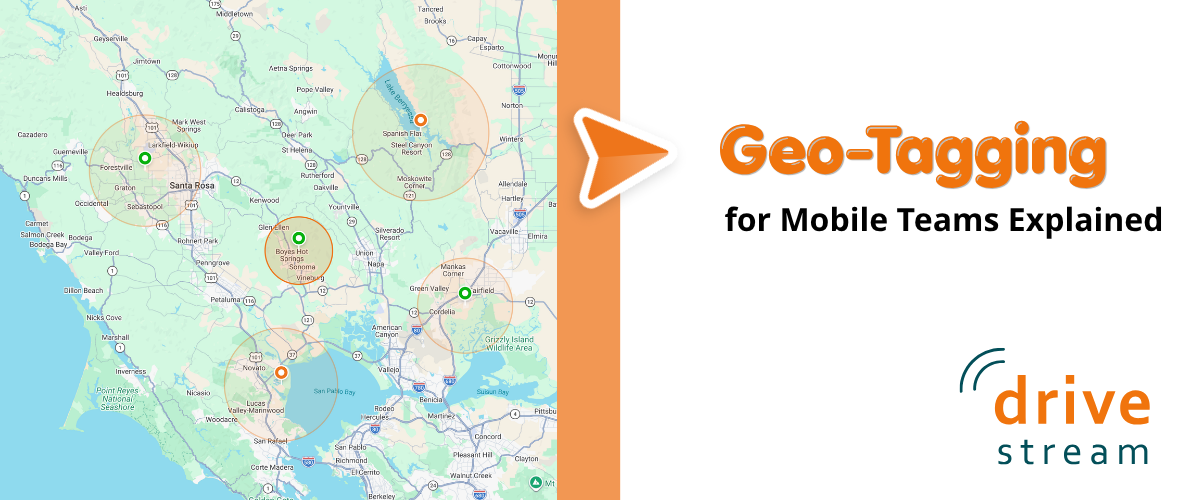
A geofence is a virtual boundary drawn around a real-world geographic location. Fleet and workforce managers use these boundaries to tag locations that matter to their operations, including customer sites, warehouses, job sites, supplier locations and fuel depots. The moment a connected vehicle or mobile device crosses that boundary, platforms like Drivestream record the event with a precise timestamp and can deliver an immediate alert to the manager and other stakeholders.
Geofences are available in two primary configurations. A circular geofence defines a boundary using a center point and a set radius, making it straightforward to deploy around a single address or facility. A polygon geofence uses a freeform shape to follow the contours of a road, property line or service territory, providing more precise coverage for irregularly shaped locations.
Once configured, geofences operate continuously in the background. No action is required from drivers or field managers. The system captures the data automatically, creating an unbroken record of field activity across the entire fleet.
Improving Operations with Geo-Tagging
Arrival and departure alerts provide important information in real time and can flag unauthorized vehicle use the moment it occurs. However, the most operationally significant data point is what happens between those two events: dwell time.
Dwell time is the duration a vehicle remains within a geofenced location. While straightforward to measure, the operational insights it produces are substantial. Dwell time data enables managers to assess how long a service call actually took, evaluate individual productivity, identify scope creep and surface opportunities to reduce operating costs.
Consider what the data reveals in practice:
- Overruns on budgeted job time: A service technician who spends 3.5 hours on a job estimated at 2 hours may be dealing with a skills gap, undisclosed scope creep or a missing part. The data surfaces the issue without requiring a supervisor to intervene in the field.
- Extended stop times: A delivery team member who takes 45 minutes on a stop that normally runs 10 minutes warrants a follow-up. That gap may indicate a delivery dispute, an access issue or a more serious operational problem.
- Vehicles that do not depart: A vehicle that arrives at a customer site and remains there throughout the business day may have broken down or the team member may be using company time and assets for personal purposes.
- Consistently short dwell times: Short dwell times at locations where thorough service is required can point to incomplete work before a customer even calls to complain.
Reviewed over days and weeks, these data points reveal operational patterns: which routes run efficiently, which stops consistently run long and where the greatest opportunities to recapture time and reduce cost are concentrated.
Where Geofencing Makes the Biggest Difference
Field Service and HVAC
When a technician departs a customer location, geofencing can automatically close the associated work order, trigger a customer satisfaction survey and confirm that service time met the terms specified in the contract. All of this occurs without administrative follow-up from the office, reducing overhead and ensuring SLA compliance is documented automatically.
Last-Mile Delivery
Arrival and departure data enables managers to compare actual stop times against planned delivery windows across the entire fleet. At scale, this comparison identifies which routes and which team members are consistently on pace and which are falling behind, enabling targeted coaching and route redesign.
Construction and Equipment Logistics
Project managers can use geofencing to verify that equipment vehicles arrive at job sites on schedule, confirm that subcontractors are physically present as contracted and receive immediate notification if equipment is moved between sites without authorization. In industries where equipment theft and unauthorized use represent significant financial exposure, this capability provides a continuous, automated security layer.
Sales and Mobile Workforce
For outside sales representatives and mobile service teams, geofencing handles visit verification automatically. Sales managers gain visibility into which accounts received in-person attention, how long each visit lasted and whether representative activity aligns with the territory plan, without relying on manual activity logs or self-reported data.
Accountability That Works Both Ways
Geofencing data creates an objective, timestamped record and that matters for both the organization and the individuals who make up the field workforce. When billing is based on time at a job site, arrival and departure records provide defensible documentation for customer invoices and disputed charges.
For employees, the same data removes ambiguity. Team members know their time is being recorded accurately, which protects them from unfair assessments and ensures that productive work is visible and attributable. Transparency about what is tracked, when and for what purpose is the critical factor that determines whether geofencing becomes a source of friction or a genuine operational asset. Organizations that communicate clearly about data use consistently report greater workforce acceptance and cooperation.
According to the American Payroll Association, time theft costs U.S. businesses an estimated 1.5 to 5 percent of gross payroll annually. Automated location-based time verification through geofencing directly addresses this exposure by replacing subjective timesheets with GPS-verified arrival and departure records.
After-Hours Alerts: A Security Layer That Never Clocks Out
Geofences are not limited to standard operating hours. Managers can configure alerts for any vehicle that enters or exits a designated zone outside of authorized timeframes, extending fleet management capabilities into an always-on security function.
If a vehicle assigned to the depot overnight departs at 2 a.m., the manager receives an immediate notification. That real-time alert is the difference between identifying an unauthorized use situation while it is still recoverable and receiving a report the following morning about a problem that has already escalated.
For fleet operators in industries with high asset values or sensitive cargo, this after-hours monitoring represents a meaningful addition to existing security protocols, one that requires no additional hardware or manual oversight once configured.
Getting the Most Out of Your Geofence Data
The operational value of geofencing scales directly with the discipline applied to its setup and the consistency with which its data is reviewed. Several practices separate organizations that use geofencing effectively from those that treat it as background infrastructure:
- Start with your highest-value locations. Prioritize major customer sites, depots and fuel stops before attempting to cover every possible vehicle stop. Focused coverage produces immediately actionable data.
- Build dwell time benchmarks from real historical data. Gut-feel estimates produce misleading exception reports. Accurate baselines are what make anomalies worth investigating.
- Connect geofencing to dispatch or field service software. When arrival and departure events trigger actual workflow steps, such as automated work order updates or customer notifications, the data produces operational results rather than sitting unused in a separate system.
- Review dwell time reports on a regular cadence. Identifying trends early is considerably more valuable than diagnosing a problem after it has already generated a customer complaint or billing dispute.
- Communicate clearly with your team members. Explain to drivers how geofencing data is used for operational improvement. Establish goals and rewards to support the use.
More Insights & Tips